YoMetro Introduces Interactive Metro Route Maps
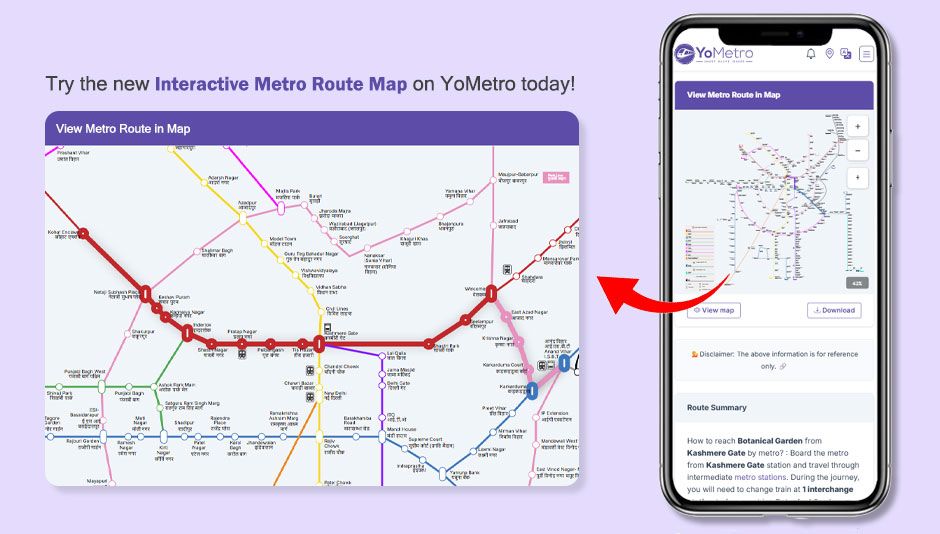
YoMetro's SVG maps highlight metro routes and display station details.
YoMetro has introduced interactive SVG metro maps that make it easier than ever to visualize and plan metro journeys across India. The new map feature brings metro networks to life with dynamic route highlighting, clickable station markers, and real-time visual cues — all within a clean, fast, and fully responsive interface.
What Are Interactive SVG Metro Maps?
YoMetro's interactive SVG (Scalable Vector Graphics) metro maps are digital representations of metro networks that are fully zoomable, scalable, and clickable. Unlike static image-based maps, SVG maps remain crisp and perfectly sharp at any zoom level and on any screen size — from a small smartphone to a large desktop display.
These maps cover all major Indian metro networks including Delhi Metro, Mumbai Metro, Bangalore Namma Metro, Hyderabad Metro, Chennai Metro, Kolkata Metro, Kochi Metro, Lucknow Metro, Jaipur Metro, and more — giving commuters a single platform to visually explore any metro system in the country.
How the Route Highlight Feature Works
The route highlight feature is at the heart of YoMetro's interactive maps. When a user searches for a metro route between two stations, the map automatically highlights the exact travel path — clearly marking the source station, the destination station, and every intermediate stop along the route.
This visual representation removes all guesswork from metro travel planning. Instead of reading a text-based list of stations, commuters can see their entire route laid out on the map in a clear and intuitive manner.
Color-Coded Metro Lines
Each metro line on the YoMetro SVG map is displayed in its official network color code, making every line immediately recognizable. When a route is highlighted, the relevant line segment is visually emphasized while other lines are subtly dimmed — helping users focus on their specific journey path.
Clickable Station Markers
Every station on the interactive map is a live, clickable marker. Tapping or clicking on any station brings up a quick information panel with key details such as the station name, the metro line it belongs to, available facilities, and first and last train timings — all without leaving the map view.
Interchange Stations Clearly Marked
For multi-line routes that require changing trains, interchange stations are highlighted with a distinct visual indicator. This allows commuters to instantly identify where they need to switch lines, eliminating confusion at busy transit hubs.
Key Features of YoMetro's Interactive Metro Maps
- Full SVG-based maps that remain crisp and sharp at any zoom level
- Route highlight feature that visually marks the complete journey path
- Official color-coded metro lines for instant network recognition
- Clickable station markers with instant info panels
- Clear visual marking of interchange stations for multi-line routes
- Seamless performance on both mobile and desktop browsers
- Covers all major Indian metro networks in a single unified platform
Benefits for Metro Commuters
Interactive maps remove the guesswork from metro travel planning. Rather than mentally piecing together a route from a text description, commuters can see their entire journey visualized on screen — making it far easier to understand interchanges, distances, and the overall path from source to destination.
For new travelers visiting an Indian city for the first time, the visual representation of metro networks is especially valuable. Being able to see the full metro system at a glance — and then zoom into specific zones — provides a level of spatial awareness that static PDF maps simply cannot offer.
Real-World Examples
A commuter traveling from Rajiv Chowk to Dwarka Sector 21 in Delhi can search the route on YoMetro and immediately see the Blue Line highlighted from source to destination — with all intermediate stations, travel time, and fare visible alongside the map.
Similarly, a traveler in Mumbai can open the interactive metro map, explore the full network at a glance, identify the nearest station to their hotel, and confidently plan their journey — all without downloading a separate app or referencing a printed map.